Principles
1. Logical grouping - Related items together
2. Consistent depth - Similar levels of nesting
3. Meaningful names - Self-explanatory
4. Scalable - Works as project grows
Research Project Folder Structure
Standard Research Project Template
Use this template for every project—consistency saves time!
Essential content
1. Project title and purpose
2. Who, when, why
3. Folder structure explanation
4. File naming conventions
5. How to reproduce analysis
6. Contact information
7. Funding/ethics acknowledgments
README Template
# Project Title: [Your Project Name] ## Overview Brief description of what this project is about (2-3 sentences). **Principal Investigator**: [Name] ([email]) **Start Date**: YYYY-MM-DD **End Date**: YYYY-MM-DD (if completed) **Funding**: [Source] Grant #[Number]**Ethics Approval**: #[Number]## Research Question What specific question(s) does this project address? ## Folder Structure - `00_admin/`: Ethics, funding, correspondence - `01_planning/`: Proposals, methodology - `02_literature/`: Papers, notes, bibliography - `03_data/`: All data (see data/README_raw_data.md) - `raw/`: Original data (NEVER EDIT) - `processed/`: Cleaned/analyzed data - `metadata/`: Codebooks, dictionaries - `04_analysis/`: Code and notebooks - `05_outputs/`: Figures, tables, reports - `06_manuscript/`: Paper drafts and submissions - `07_presentations/`: Conference slides - `08_archive/`: Old/superseded materials ## File Naming Convention Format: `YYYY-MM-DD_description_version.extension`Example: `2024-02-15_survey_data_cleaned_v2.csv`## Data Description - **Data source**: [Where data came from]- **Sample size**: N = [number]- **Variables**: [Brief list]- **Data collection period**: [Dates]## Analysis Workflow 1. Data cleaning: `scripts/01_data_cleaning.R`2. Descriptive stats: `scripts/02_descriptive_stats.R`3. Main analysis: `scripts/03_main_analysis.R`4. Visualizations: `scripts/04_visualizations.R`See `notebooks/main_analysis.Rmd` for integrated analysis. ## Software/Dependencies - R version 4.3.0 - Required packages: tidyverse (1.3.2), lme4 (1.1-30) - See `renv.lock` for complete environment ## How to Reproduce 1. Open `ProjectName.Rproj`2. Run `renv::restore()` to install packages 3. Run scripts in order (01 → 04) 4. Or knit `notebooks/main_analysis.Rmd`## Publications - [Author list]. (Year). Title. *Journal*. DOI: xxx ## Data Sharing Data available at: [Repository URL]DOI: [Data DOI]## License [CC-BY 4.0 / Other]## Contact For questions: [email]## Last Updated YYYY-MM-DD by [Name]
File Naming Conventions
Bad File Names Cause Problems!
Problems with bad names
- Can’t find files
- Don’t know which version is current
- Can’t sort chronologically
- Confusion about content
- Broken workflows (spaces in names)
Why good
- Sorts chronologically
- Describes content
- Shows progression
- No spaces
- Unique and informative
File Naming Rules
DO
- Use YYYY-MM-DD format for dates
- Use underscores (_) or hyphens (-)
- Be descriptive but concise
- Use consistent capitalization (lowercase recommended)
- Include version numbers
- Keep length under 50 characters (if possible)
DON’T
- ❌ Use spaces (use _ or - instead)
- ❌ Use special characters: !, @, #, $, %, &, *, (, ), [, ], {, }, <, >, ?, /, , |, :, ;, ”
- ❌ Use periods except before extension
- ❌ Use ambiguous terms (final, new, old)
- ❌ Make names too long (>100 characters)
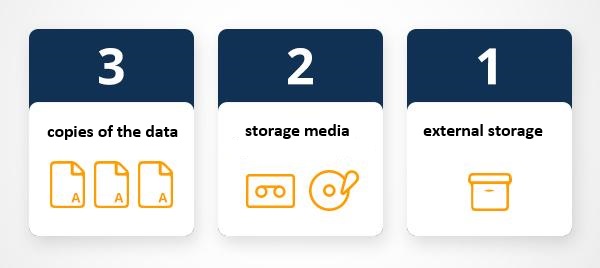
Backup 1
- External hard drive #1 (kept at office)
Backup 2
- External hard drive #2 (kept at home)
Cost ~$120-200 for two drives
Backup Schedule
Automated (no effort)
- Cloud sync (OneDrive/Google Drive): Continuous
- Time Machine (Mac) / File History (Windows): Hourly
Manual (scheduled)
- 📅 Weekly: Backup to external drive
- 📅 Monthly: Verify backups work
- 📅 Before major work: Manual snapshot
Critical moments
- ⚠️ Before submitting manuscript
- ⚠️ Before major analysis
- ⚠️ Before computer upgrade/repair
Cloud Storage Options
Service
Free Storage
Paid Options
Best For
Sensitive Data?
UQ RDM
Generous
Included for UQ
Research data, sensitive data
✅ YES
OneDrive
5 GB
1 TB with Office 365
Office docs, collaboration
⚠️ NO
Google Drive
15 GB
100 GB ($2/mo)
Mixed files, sharing
⚠️ NO
Dropbox
2 GB
2 TB ($10/mo)
Sync across devices
⚠️ NO
Sync.com
5 GB
2 TB ($8/mo)
Encrypted cloud
✅ YES
Sensitive Data = UQ RDM
NEVER put sensitive data in public cloud
- ❌ OneDrive (unless UQ-managed)
- ❌ Google Drive
- ❌ Dropbox
- ❌ iCloud
Use instead
- UQ Research Data Manager (RDM)
- Encrypted external drives
- Local encrypted storage
Never Edit Raw Data!
Critical Rule
Raw data is sacred - Never modify original files!
Why
1. Irreversible: Can’t undo changes
2. Transparency: Others need to see originals
3. Reproducibility: Analysis must start from raw data
4. Audit trail: Track all transformations
# Processing Log

## 2024-02-01: Initial Cleaning
- Removed 15 duplicate rows
- Fixed typos in Q3 responses
- Converted date format
- Script: scripts/01_data_cleaning.R

## 2024-02-05: Coding
- Applied coding scheme to open-ended responses
- Created new variables: theme1, theme2
- Script: scripts/02_coding.R
Part 4: Sensitive Data Management
What is Sensitive Data?
Sensitive data = Data that could cause harm if disclosed
Categories
1. Personal Information
- Names, addresses
- Email addresses, phone numbers
- ID numbers (student ID, driver’s license)
- Photos (identifiable faces)
- Voice recordings
- Handwriting samples
2. Health/Medical Data
- Medical records
- Mental health information
- Genetic data
- Disability status
3. Financial Data
- Bank details
- Credit card numbers
- Income information
4. Location Data
- GPS coordinates (home, workplace)
- Check-in data
- Travel patterns
5. Demographic Data (when combined)
- Age + gender + occupation + location
- Can identify individuals
6. Research-Specific
- Unpublished findings
- Proprietary methods
- Endangered species locations
- Archaeological site coordinates
Deidentification Process
What is Deidentification?
Remove/replace information that could identify individuals
Goal Data usable for research but not re-identifiable
Step-by-Step Deidentification
1. Identify all identifiable variables
Raw data columns:
- name
- email
- phone
- address
- date_of_birth
- student_id
- response_text (may contain names/places)
2. Create deidentification key
# deidentification_key.csv (ENCRYPTED, SEPARATE STORAGE)
participant_id,name,email,student_id
P001,Jane Smith,jane@email.com,12345678
P002,John Doe,john@email.com,87654321
3. Create deidentified dataset
# deidentified_data.csv (SHAREABLE)
participant_id,age,gender,response_score,response_text_redacted
P001,23,F,45,"I love studying at [UNIVERSITY]"
P002,25,M,38,"My experience in [PROGRAM] was..."
4. Redact identifying information from text
- Names → [NAME]
- Places → [LOCATION]
- Organizations → [ORGANIZATION]
- Dates → [DATE] (or generalize to month/year)
Deidentification Best Practices
DO
- Plan deidentification from the start
- Document all changes (deidentification log)
- Store key separately from data
- Encrypt deidentification key
- Use meaningful replacement codes (P001, not random)
- Generalize where possible (age ranges, regions)
- Review text fields manually
DON’T
- ❌ Delete identifying data (keep in separate file)
- ❌ Store key with deidentified data
- ❌ Share encryption passwords via email
- ❌ Forget about indirect identifiers
- ❌ Assume pseudonyms are sufficient
Indirect Identification Risk
Combination of variables can identify people!
Example
- Female
- 75 years old
- Professor
- Linguistics department
- University of Queensland
→ Highly identifiable even without name!
Solutions
1. Generalize
- Age → Age range (70-80)
- Rank → “Academic staff”
- Department → “Humanities”
Remove variables
Only include variables needed for analysis
Less detail = less risk
Aggregate
Report only group statistics
No individual-level data
Managing Sensitive Data
Storage
Sensitive data location hierarchy
Most secure
1. UQ RDM - Approved for sensitive research data
2. Encrypted external drive - Physically secured
3. Encrypted local folder - Password-protected computer
NOT acceptable
- ❌ Email
- ❌ USB drives (unless encrypted)
- ❌ Personal cloud storage
- ❌ Shared network drives (unless approved)
- ❌ Laptops without encryption
Access Control
Who can access sensitive data?
Principle Minimum necessary access
Access levels
1. Principal Investigator: Full access
2. Approved research team: Data analysis access
3. Data manager: Storage/organization only
4. No one else: No access
--- title: "Survey Data Analysis" author: "Your Name" date: "2024-02-15" output: html_document ---# Introduction This analysis examines the relationship between age and test performance in our cognitive study (N=132). # Setup ::: {.cell}```{.r .cell-code}library(tidyverse) library(lme4) # Load data data <- read_csv("data/processed/2024-02-10_survey_final.csv") ```:::# Descriptive Statistics ::: {.cell}```{.r .cell-code}summary(data$age) summary(data$test_score) # Visualize ggplot(data, aes(x=age, y=test_score)) + geom_point() + geom_smooth(method="lm") ```:::**Finding**: Negative correlation between age and test score (r = -.45). # Main Analysis ::: {.cell}```{.r .cell-code}model <- lm(test_score ~ age + gender + education_level, data=data) summary(model) ```:::**Result**: Age significantly predicts test score (β = -0.52, p < .001). # Conclusion [Your interpretation]
Documentation Best Practices
Write for Your Future Self
Document as if
- You’ll forget everything in 6 months (you will!)
- Someone else will take over tomorrow
- You need to defend every decision
Good documentation
- Explains what AND why
- Uses plain language
- Includes examples
- Is kept up-to-date
- Lives with the data/code
Bad documentation
- ❌ “Data is in the folder”
- ❌ Outdated
- ❌ Uses jargon
- ❌ Assumes knowledge
For data
- UQ RDM → UQ eSpace (automatic)
- Open Science Framework (OSF)
- Zenodo
- figshare
For code
- GitHub + Zenodo integration
- Archive releases with DOI
Data Repositories
UQ Research Data Manager (RDM)
- Free for UQ researchers
- Meets funder requirements
- Secure (sensitive data OK)
- Automatic DOI via eSpace
- FAIR compliant
- https://research.uq.edu.au/rmbt/uqrdm
Open Science Framework (OSF)
- Free, open
- Project management + data sharing
- DOI for datasets
- Pre-registration
- https://osf.io
Zenodo
- Free, open
- Integrates with GitHub
- Large file support (50 GB)
- https://zenodo.org
Figshare
- Free for public data
- Good for small datasets
- Visualizations
- https://figshare.com
Martin Schweinberger. 2026. Introduction to Data Management for Researchers. The Language Technology and Data Analysis Laboratory (LADAL), The University of Queensland, Australia. url: https://ladal.edu.au/tutorials/datamanage/datamanage.html (Version 2026.03.27), doi: .
@manual{martinschweinberger2026introduction,
  author       = {Martin Schweinberger},
  title        = {Introduction to Data Management for Researchers},
  year         = {2026},
  note         = {https://ladal.edu.au/tutorials/datamanage/datamanage.html},
  organization = {The Language Technology and Data Analysis Laboratory (LADAL), The University of Queensland, Australia},
  edition      = {2026.03.27}
  doi      = {}
}
Code
sessionInfo()
R version 4.4.2 (2024-10-31 ucrt)
Platform: x86_64-w64-mingw32/x64
Running under: Windows 11 x64 (build 26200)

Matrix products: default


locale:
[1] LC_COLLATE=English_United States.utf8
[2] LC_CTYPE=English_United States.utf8
[3] LC_MONETARY=English_United States.utf8
[4] LC_NUMERIC=C
[5] LC_TIME=English_United States.utf8

time zone: Australia/Brisbane
tzcode source: internal

attached base packages:
[1] stats     graphics  grDevices datasets  utils     methods   base

loaded via a namespace (and not attached):
 [1] htmlwidgets_1.6.4 compiler_4.4.2    fastmap_1.2.0     cli_3.6.4
 [5] htmltools_0.5.9   tools_4.4.2       rstudioapi_0.17.1 yaml_2.3.10
 [9] rmarkdown_2.30    knitr_1.51        jsonlite_1.9.0    xfun_0.56
[13] digest_0.6.39     rlang_1.1.7       renv_1.1.1        evaluate_1.0.3
AI Transparency Statement
This tutorial was written with the assistance of Claude (claude.ai), a large language model created by Anthropic. Claude was used to draft and structure the entire tutorial, including all R code, conceptual explanations, and exercises. All content was reviewed and approved by Martin Schweinberger, who takes full responsibility for its accuracy.
Baker, Monya. 2016. “1,500 Scientists Lift the Lid on Reproducibility.” Nature Publishing Group UK London.
Corea, Francesco. 2019. An Introduction to Data: Everything You Need to Know about AI, Big Data and Data Science. Switzerland: Springer Nature Switzerland AG.
Piwowar, Heather A, Roger S Day, and Douglas B Fridsma. 2007. “Sharing Detailed Research Data Is Associated with Increased Citation Rate.”PloS One 2 (3): e308.
Tenopir, Carol, Suzie Allard, Kimberly Douglass, Arsev Umur Aydinoglu, Lei Wu, Eleanor Read, Maribeth Manoff, and Mike Frame. 2011. “Data Sharing by Scientists: Practices and Perceptions.”PloS One 6 (6): e21101.
Source Code
---title: "Introduction to Data Management for Researchers"author: "Martin Schweinberger"date: "2026"params: title: "Introduction to Data Management for Researchers" author: "Martin Schweinberger" year: "2026" version: "2026.03.27" url: "https://ladal.edu.au/tutorials/datamanage/datamanage.html" institution: "The Language Technology and Data Analysis Laboratory (LADAL), The University of Queensland, Australia" description: "This tutorial covers fundamental data management practices for researchers working with language data, including folder structures, file naming conventions, and data documentation strategies. It is designed for beginners in linguistics and the humanities who want to build reproducible and well-organised research workflows." doi: "10.5281/zenodo.19332651"format: html: toc: true toc-depth: 4 code-fold: show code-tools: true theme: cosmo---{width="100%"} # Welcome! {.unnumbered} {width="15%" style="float:right; padding:10px"} ::: {.callout-tip} ## What You'll Learn By the end of this tutorial, you will be able to: - **Organize files systematically**: Create sustainable folder structures - **Name files effectively**: Implement consistent naming conventions - **Manage data safely**: Apply the 3-2-1 backup rule - **Handle sensitive data**: Follow deidentification protocols - **Document thoroughly**: Make your work reproducible - **Version control**: Track changes with Git - **Share responsibly**: Understand DOIs and persistent identifiers **Essential for** Research transparency Reproducible science Efficient collaboration Long-term data preservation ::: --- ## Who This Tutorial is For **All researchers working with data**, regardless of field: - 🔬 **Scientists** - Managing experimental data - 📊 **Social scientists** - Survey and interview data - 💻 **Digital humanists** - Text corpora and archives - 🎓 **Graduate students** - Building research practices - 👥 **Research teams** - Collaborative data management **No prior data management training required!** --- ## Why Data Management Matters {width="40%" style="float:right; padding:10px"} **The hidden costs of poor data management** **Time** - 30% of research time spent searching for files [@tenopir2011data]- Average: 4 hours/week = 208 hours/year lost **Money** - Re-creating lost data: $1,000s - $100,000s - Failed projects due to data loss - Missed funding due to inadequate data plans **Career** - Inability to respond to data requests - Retracted papers due to irreproducible results - Damaged reputation from data breaches **Science** - Irreproducible findings (70% of researchers [@baker2016reproducibility]) - Knowledge loss when researchers leave - Slowed scientific progress ::: {.callout-important} ## Investment vs. Return **Time investment**: 5-10 hours upfront + 30 min/week **Time saved**: 200+ hours/year **Additional benefits**: Better research, easier collaboration, fundable proposals **Data management is not overhead—it's essential infrastructure.** ::: --- # Part 1: Understanding Data Management {#part1} ## What is Data Management? **Data management** is the comprehensive set of practices for managing data throughout its entire lifecycle [@corea2019data]. ### The Data Lifecycle ``` ┌─────────────┐ │ PLAN │ ← Design data collection strategy └──────┬──────┘ │ ┌──────▼──────┐ │ COLLECT │ ← Gather data systematically └──────┬──────┘ │ ┌──────▼──────┐ │ PROCESS │ ← Clean, transform, analyze └──────┬──────┘ │ ┌──────▼──────┐ │ STORE │ ← Securely preserve └──────┬──────┘ │ ┌──────▼──────┐ │ SHARE │ ← Publish, archive └──────┬──────┘ │ ┌──────▼──────┐ │ REUSE │ ← Enable future research └─────────────┘ ```--- ## Core Components of Data Management ### 1. Data Collection and Acquisition - Systematic gathering from sources - Consistent methods and formats - Documentation of provenance ### 2. Data Storage - Secure, accessible repositories - Multiple copies (backups) - Appropriate security levels ### 3. Data Cleaning and Preparation - Quality assurance - Error correction - Standardization ### 4. Data Integration - Combining sources - Harmonizing formats - Maintaining relationships ### 5. Data Governance - Policies and procedures - Roles and responsibilities - Compliance with regulations ### 6. Data Security - Protection from unauthorized access - Encryption when needed - Regular security audits ### 7. Data Analysis - Reproducible methods - Documented workflows - Version-controlled code ### 8. Data Visualization - Meaningful representations - Publication-quality graphics - Interactive dashboards ### 9. Data Quality Management - Continuous monitoring - Validation processes - Error tracking ### 10. Metadata Management - Comprehensive documentation - Standardized formats - Context preservation ### 11. Data Lifecycle Management - Planning for long-term preservation - Retention policies - Responsible disposal --- ## Benefits of Good Data Management ::: {.callout-tip} ## Immediate Benefits **For you** - Find files in seconds, not hours - Prevent data loss - Work more efficiently - Reduce stress **For your research** - Ensure reproducibility - Enable collaboration - Meet funder requirements - Increase impact (citable data) **For science** - Accelerate discovery - Enable meta-analyses - Reduce waste - Build cumulative knowledge ::: --- # Part 2: Organizing Files and Folders {#part2} ## Folder Structure Principles ### Hierarchical Organization **Tree structure** General → Specific ``` Work/ ├── Research/ │ ├── Active_Projects/ │ ├── Completed_Projects/ │ └── Publications/ ├── Teaching/ │ ├── 2024_S1/ │ ├── 2024_S2/ │ └── Course_Materials/ └── Admin/ ├── Grants/ ├── Reviews/ └── Service/ ```**Principles** 1. **Logical grouping** - Related items together 2. **Consistent depth** - Similar levels of nesting 3. **Meaningful names** - Self-explanatory 4. **Scalable** - Works as project grows --- ## Research Project Folder Structure ::: {.callout-note} ## Standard Research Project Template **Use this template for every project**—consistency saves time! ::: ``` ProjectName_YYYY/ ├── README.md ← START HERE! ├── 00_admin/ │ ├── ethics/ │ │ ├── ethics_application.pdf │ │ ├── ethics_approval.pdf │ │ └── consent_forms/ │ ├── funding/ │ │ ├── grant_application.pdf │ │ └── budget.xlsx │ └── correspondence/ │ └── emails/ ├── 01_planning/ │ ├── research_proposal.docx │ ├── methodology.docx │ ├── timeline.xlsx │ └── notes/ ├── 02_literature/ │ ├── pdfs/ │ │ └── Author_Year_Title.pdf │ ├── notes/ │ │ ├── reading_notes.md │ │ └── synthesis.docx │ └── bibliography.bib ├── 03_data/ │ ├── raw/ ← NEVER EDIT! │ │ ├── README_raw_data.md ← Explain source │ │ ├── 2024-01-15_survey_responses.csv │ │ └── 2024-01-15_interview_recordings/ │ ├── processed/ │ │ ├── 2024-02-01_cleaned.csv │ │ ├── 2024-02-05_coded.csv │ │ └── 2024-02-10_analyzed.csv │ ├── metadata/ │ │ ├── codebook.xlsx │ │ ├── variable_definitions.md │ │ └── data_dictionary.csv │ └── sensitive/ ← Access restricted │ ├── identifiable_data.csv │ └── deidentification_key.csv (encrypted) ├── 04_analysis/ │ ├── scripts/ │ │ ├── 01_data_cleaning.R │ │ ├── 02_descriptive_stats.R │ │ ├── 03_main_analysis.R │ │ └── 04_visualizations.R │ ├── notebooks/ │ │ ├── exploratory_analysis.Rmd │ │ └── main_analysis.Rmd │ └── logs/ │ └── analysis_log.md ├── 05_outputs/ │ ├── figures/ │ │ ├── figure_01_descriptives.png │ │ └── figure_02_results.png │ ├── tables/ │ │ ├── table_01_demographics.csv │ │ └── table_02_results.csv │ └── reports/ │ ├── preliminary_results.pdf │ └── final_report.pdf ├── 06_manuscript/ │ ├── drafts/ │ │ ├── 2024-03-01_v1.docx │ │ ├── 2024-03-15_v2.docx │ │ └── 2024-03-30_v3_submitted.docx │ ├── reviews/ │ │ ├── reviewer_comments.pdf │ │ └── response_to_reviewers.docx │ ├── revisions/ │ │ └── 2024-05-15_revision_1.docx │ └── final/ │ ├── accepted_manuscript.docx │ └── published_version.pdf ├── 07_presentations/ │ ├── 2024-04-10_Conference_ABC.pptx │ └── 2024-06-20_Seminar_UQ.pptx └── 08_archive/ ├── old_versions/ └── superseded_materials/ ```--- ## README Files - Your Project Guide ::: {.callout-important} ## Every Project Needs a README! **README.md** = Roadmap to your project **Essential content** 1. Project title and purpose 2. Who, when, why 3. Folder structure explanation 4. File naming conventions 5. How to reproduce analysis 6. Contact information 7. Funding/ethics acknowledgments ::: ### README Template ```markdown # Project Title: [Your Project Name] ## Overview Brief description of what this project is about (2-3 sentences). **Principal Investigator**: [Name] ([email]) **Start Date**: YYYY-MM-DD **End Date**: YYYY-MM-DD (if completed) **Funding**: [Source] Grant #[Number]**Ethics Approval**: #[Number]## Research Question What specific question(s) does this project address? ## Folder Structure - `00_admin/`: Ethics, funding, correspondence - `01_planning/`: Proposals, methodology - `02_literature/`: Papers, notes, bibliography - `03_data/`: All data (see data/README_raw_data.md) - `raw/`: Original data (NEVER EDIT) - `processed/`: Cleaned/analyzed data - `metadata/`: Codebooks, dictionaries - `04_analysis/`: Code and notebooks - `05_outputs/`: Figures, tables, reports - `06_manuscript/`: Paper drafts and submissions - `07_presentations/`: Conference slides - `08_archive/`: Old/superseded materials ## File Naming Convention Format: `YYYY-MM-DD_description_version.extension`Example: `2024-02-15_survey_data_cleaned_v2.csv`## Data Description - **Data source**: [Where data came from]- **Sample size**: N = [number]- **Variables**: [Brief list]- **Data collection period**: [Dates]## Analysis Workflow 1. Data cleaning: `scripts/01_data_cleaning.R`2. Descriptive stats: `scripts/02_descriptive_stats.R`3. Main analysis: `scripts/03_main_analysis.R`4. Visualizations: `scripts/04_visualizations.R`See `notebooks/main_analysis.Rmd` for integrated analysis. ## Software/Dependencies - R version 4.3.0 - Required packages: tidyverse (1.3.2), lme4 (1.1-30) - See `renv.lock` for complete environment ## How to Reproduce 1. Open `ProjectName.Rproj`2. Run `renv::restore()` to install packages 3. Run scripts in order (01 → 04) 4. Or knit `notebooks/main_analysis.Rmd`## Publications - [Author list]. (Year). Title. *Journal*. DOI: xxx ## Data Sharing Data available at: [Repository URL]DOI: [Data DOI]## License [CC-BY 4.0 / Other]## Contact For questions: [email]## Last Updated YYYY-MM-DD by [Name]```--- ## File Naming Conventions ::: {.callout-warning} ## Bad File Names Cause Problems! **Problems with bad names** - Can't find files - Don't know which version is current - Can't sort chronologically - Confusion about content - Broken workflows (spaces in names) ::: ### Anatomy of a Good File Name **Formula** ``` YYYY-MM-DD_project_description_version_status.extension ```**Components** 1. **Date** (YYYY-MM-DD): Sorts chronologically 2. **Project code**: Links to specific project 3. **Description**: What it contains 4. **Version**: v1, v2, v3 5. **Status**: draft, final, submitted 6. **Extension**: .csv, .docx, .R ### Examples: Bad vs. Good **BAD** ``` ❌ final.docx ❌ finalFINAL.docx ❌ use this one!!!.docx ❌ data.csv ❌ New Document (2).docx ```**Why bad** - No date (can't sort) - No description (what is it?) - Spaces (breaks code) - Ambiguous (which is "final"?) - Generic (many "data.csv" files) **GOOD** ``` 2024-02-15_ProjectA_participant_demographics_v1.csv 2024-03-01_ProjectA_analysis_results_v2_final.csv 2024-03-10_ProjectA_manuscript_draft_v3.docx 2024-03-25_ProjectA_manuscript_submitted.docx 2024-05-15_ProjectA_manuscript_revised_v1.docx ```**Why good** - Sorts chronologically - Describes content - Shows progression - No spaces - Unique and informative --- ### File Naming Rules **DO** - Use YYYY-MM-DD format for dates - Use underscores (_) or hyphens (-) - Be descriptive but concise - Use consistent capitalization (lowercase recommended) - Include version numbers - Keep length under 50 characters (if possible) **DON'T** - ❌ Use spaces (use _ or - instead) - ❌ Use special characters: !, @, #, $, %, &, *, (, ), [, ], {, }, <, >, ?, /, \, |, :, ;, " - ❌ Use periods except before extension - ❌ Use ambiguous terms (final, new, old) - ❌ Make names too long (>100 characters) --- ### Naming Convention Examples by File Type **Data files** ``` 2024-01-15_surveyA_raw_responses.csv 2024-01-20_surveyA_cleaned.csv 2024-01-25_surveyA_coded_final.csv ```**Analysis scripts** ``` 01_data_cleaning.R 02_descriptive_statistics.R 03_regression_models.R 04_create_visualizations.R ```**Manuscripts** ``` 2024-03-01_manuscript_outline.docx 2024-03-15_manuscript_draft_v1.docx 2024-04-01_manuscript_draft_v2.docx 2024-04-20_manuscript_submitted.docx 2024-06-15_manuscript_revision_v1.docx ```**Presentations** ``` 2024-05-10_conference_ABC_poster.pptx 2024-06-20_seminar_UQ_talk.pptx ```--- ## Teaching Folder Structure **Different needs than research!** ``` Teaching/ ├── 2024_S1_LING3000/ │ ├── README.md │ ├── syllabus/ │ │ ├── syllabus_2024.pdf │ │ └── schedule.xlsx │ ├── lectures/ │ │ ├── Week01_Introduction.pptx │ │ ├── Week02_Methods.pptx │ │ └── ... │ ├── readings/ │ │ ├── required/ │ │ └── supplementary/ │ ├── assignments/ │ │ ├── assignment_01_instructions.pdf │ │ ├── assignment_01_rubric.xlsx │ │ └── assignment_01_submissions/ │ ├── exams/ │ │ ├── midterm_2024.docx │ │ ├── final_2024.docx │ │ └── answer_keys/ (restricted access) │ ├── student_materials/ │ │ ├── tutorial_data/ │ │ └── practice_exercises/ │ └── correspondence/ │ ├── student_emails/ │ └── administrative/ └── 2024_S2_LING4000/ └── [same structure] ```--- # Part 3: Data Safety and Backup {#part3} ## The 3-2-1 Backup Rule 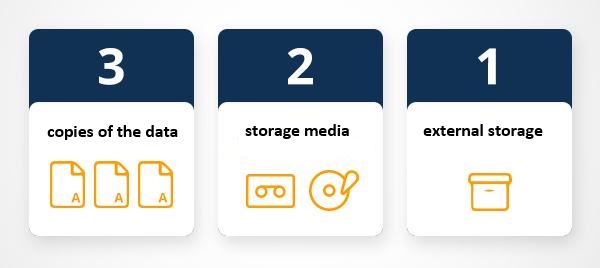{width="50%" style="float:right; padding:10px"} ::: {.callout-important} ## Non-Negotiable Data Protection **3-2-1 Rule** **3** = Three copies of your data - 1 primary (working copy) - 2 backups **2** = Two different storage media - Local drive + external drive - Or: local drive + cloud **1** = One copy offsite - Cloud storage - External drive at different location - Protects against fire, theft, disaster ::: --- ## Practical Implementation ### Example 1: Cloud-Focused **Working copy** - Laptop/desktop **Backup 1** - External hard drive (weekly backup) **Backup 2** - Cloud storage (OneDrive/Google Drive - continuous) **Cost** ~$5/month + external drive ($60-100) --- ### Example 2: Privacy-Focused (Sensitive Data) **Working copy** - Desktop computer **Backup 1** - External hard drive #1 (kept at office) **Backup 2** - External hard drive #2 (kept at home) **Cost** ~$120-200 for two drives --- ### Backup Schedule **Automated (no effort)** - Cloud sync (OneDrive/Google Drive): Continuous - Time Machine (Mac) / File History (Windows): Hourly **Manual (scheduled)** - 📅 **Weekly**: Backup to external drive - 📅 **Monthly**: Verify backups work - 📅 **Before major work**: Manual snapshot **Critical moments** - ⚠️ Before submitting manuscript - ⚠️ Before major analysis - ⚠️ Before computer upgrade/repair --- ## Cloud Storage Options | Service | Free Storage | Paid Options | Best For | Sensitive Data? | |---------|--------------|--------------|----------|-----------------| | **UQ RDM** | Generous | Included for UQ | Research data, sensitive data | ✅ YES | | **OneDrive** | 5 GB | 1 TB with Office 365 | Office docs, collaboration | ⚠️ NO | | **Google Drive** | 15 GB | 100 GB ($2/mo) | Mixed files, sharing | ⚠️ NO | | **Dropbox** | 2 GB | 2 TB ($10/mo) | Sync across devices | ⚠️ NO | | **Sync.com** | 5 GB | 2 TB ($8/mo) | Encrypted cloud | ✅ YES | ::: {.callout-warning} ## Sensitive Data = UQ RDM **NEVER put sensitive data in public cloud** - ❌ OneDrive (unless UQ-managed) - ❌ Google Drive - ❌ Dropbox - ❌ iCloud **Use instead** - UQ Research Data Manager (RDM) - Encrypted external drives - Local encrypted storage ::: --- ## Never Edit Raw Data! ::: {.callout-important} ## Critical Rule **Raw data is sacred** - Never modify original files! **Why** 1. **Irreversible**: Can't undo changes 2. **Transparency**: Others need to see originals 3. **Reproducibility**: Analysis must start from raw data 4. **Audit trail**: Track all transformations ::: **Workflow** ``` raw/ ├── 2024-01-15_survey_responses_ORIGINAL.csv ← NEVER TOUCH! └── README_raw_data.md ← Explains source processed/ ├── 2024-02-01_survey_cleaned.csv ← Copy and modify ├── 2024-02-05_survey_coded.csv └── processing_log.md ← Document changes ```**Document every change** ```markdown # Processing Log ## 2024-02-01: Initial Cleaning - Removed 15 duplicate rows - Fixed typos in Q3 responses - Converted date format - Script: scripts/01_data_cleaning.R ## 2024-02-05: Coding - Applied coding scheme to open-ended responses - Created new variables: theme1, theme2 - Script: scripts/02_coding.R ``` --- # Part 4: Sensitive Data Management {#part4} ## What is Sensitive Data? **Sensitive data** = Data that could cause harm if disclosed **Categories** **1. Personal Information** - Names, addresses - Email addresses, phone numbers - ID numbers (student ID, driver's license) - Photos (identifiable faces) - Voice recordings - Handwriting samples **2. Health/Medical Data** - Medical records - Mental health information - Genetic data - Disability status **3. Financial Data** - Bank details - Credit card numbers - Income information **4. Location Data** - GPS coordinates (home, workplace) - Check-in data - Travel patterns **5. Demographic Data (when combined)** - Age + gender + occupation + location - Can identify individuals **6. Research-Specific** - Unpublished findings - Proprietary methods - Endangered species locations - Archaeological site coordinates --- ## Deidentification Process ### What is Deidentification? **Remove/replace information** that could identify individuals **Goal** Data usable for research but not re-identifiable --- ### Step-by-Step Deidentification **1. Identify all identifiable variables** ```Raw data columns: - name - email - phone - address - date_of_birth - student_id - response_text (may contain names/places) ``` **2. Create deidentification key** ```csv # deidentification_key.csv (ENCRYPTED, SEPARATE STORAGE) participant_id,name,email,student_id P001,Jane Smith,jane@email.com,12345678 P002,John Doe,john@email.com,87654321 ```**3. Create deidentified dataset** ```csv # deidentified_data.csv (SHAREABLE) participant_id,age,gender,response_score,response_text_redacted P001,23,F,45,"I love studying at [UNIVERSITY]" P002,25,M,38,"My experience in [PROGRAM] was..." ```**4. Redact identifying information from text** - Names → [NAME]- Places → [LOCATION]- Organizations → [ORGANIZATION]- Dates → [DATE] (or generalize to month/year) --- ### Deidentification Best Practices **DO** - Plan deidentification from the start - Document all changes (deidentification log) - Store key separately from data - Encrypt deidentification key - Use meaningful replacement codes (P001, not random) - Generalize where possible (age ranges, regions) - Review text fields manually **DON'T** - ❌ Delete identifying data (keep in separate file) - ❌ Store key with deidentified data - ❌ Share encryption passwords via email - ❌ Forget about indirect identifiers - ❌ Assume pseudonyms are sufficient --- ### Indirect Identification Risk **Combination of variables can identify people!** **Example** ```- Female - 75 years old - Professor - Linguistics department - University of Queensland ``` → Highly identifiable even without name! **Solutions** 1. **Generalize** - Age → Age range (70-80) - Rank → "Academic staff" - Department → "Humanities" 2. **Remove variables** - Only include variables needed for analysis - Less detail = less risk 3. **Aggregate** - Report only group statistics - No individual-level data --- ## Managing Sensitive Data ### Storage **Sensitive data location hierarchy** **Most secure** 1. **UQ RDM** - Approved for sensitive research data 2. **Encrypted external drive** - Physically secured 3. **Encrypted local folder** - Password-protected computer **NOT acceptable** - ❌ Email - ❌ USB drives (unless encrypted) - ❌ Personal cloud storage - ❌ Shared network drives (unless approved) - ❌ Laptops without encryption --- ### Access Control **Who can access sensitive data?** **Principle** Minimum necessary access **Access levels** 1. **Principal Investigator**: Full access 2. **Approved research team**: Data analysis access 3. **Data manager**: Storage/organization only 4. **No one else**: No access **Implementation** - Password-protected files - Encrypted folders - Access logs - Regular access review --- ### Secure Sharing **When you must share sensitive data** **1. Check ethics approval** - Does it permit data sharing? - With whom? - Under what conditions? **2. Use secure methods** - UQ secure file transfer - Encrypted email attachments - Password-protected files (password sent separately) - ❌ Regular email attachments - ❌ Cloud sharing links **3. Data sharing agreement** - Written agreement before sharing - Specify permitted uses - Require secure storage - Set destruction date --- ## Sensitive Data Checklist ::: {.callout-tip} ## Before Collecting Sensitive Data - [ ] Ethics approval obtained - [ ] Participants informed about data storage/use - [ ] Secure storage arranged (UQ RDM) - [ ] Deidentification plan created - [ ] Access control plan documented - [ ] Retention schedule established - [ ] Destruction protocol planned ::: --- # Part 5: Documentation {#part5} {width="50%" style="float:right; padding:10px"} ## The Bus Factor **Bus Factor** = Number of people who must be unavailable for project to fail **Most projects** Bus Factor = 1 (YOU!) **Problem** If you're unavailable: - No one knows where files are - No one understands your workflow - No one can continue the work - Project halts **Solution** Documentation raises the bus factor! **Good documentation means** - Anyone can understand your project - Anyone can find files - Anyone can reproduce analysis - Project survives your absence --- ## What to Document ### 1. Project Overview - What is this project? - Why does it exist? - What are the goals? - Who is involved? ### 2. Data - Where did data come from? - How was it collected? - What do variables mean? - What are units of measurement? - Any known issues or limitations? ### 3. Organization - Folder structure explanation - File naming conventions - Where to find specific items ### 4. Workflow - Step-by-step process - Software/tools used - Order of operations - Dependencies ### 5. Analysis - Methods used - Why these methods? - Interpretation of results - Assumptions made ### 6. People - Who to contact for what - Roles and responsibilities - Decision-making authority --- ## Documentation Tools ### README Files **Where** Every project folder (top level + subdirectories) **Format** Markdown (.md) or plain text (.txt) **Content** - Project description - Folder/file explanation - How to use - Contact info --- ### Codebooks **For datasets** - Explain every variable **Example codebook** ```markdown # Codebook: Survey Data ## participant_id - **Description**: Unique identifier for each participant - **Type**: Character - **Format**: P### (e.g., P001, P002) - **Range**: P001 to P150 ## age - **Description**: Participant age in years - **Type**: Integer - **Range**: 18-75 - **Missing values**: -99 = refused to answer ## gender - **Description**: Self-reported gender - **Type**: Categorical - **Values**: - 1 = Woman - 2 = Man - 3 = Non-binary - 4 = Prefer to self-describe - 5 = Prefer not to say - **Missing values**: NA = not asked (added in v2) ## education_level - **Description**: Highest completed education - **Type**: Ordinal - **Values**: - 1 = Less than high school - 2 = High school - 3 = Bachelor's degree - 4 = Master's degree - 5 = Doctoral degree ## test_score - **Description**: Performance on cognitive test - **Type**: Numeric - **Range**: 0-100 - **Units**: Percentage correct - **Notes**: Higher = better performance ```--- ### Data Dictionaries **Spreadsheet version of codebook** | Variable | Description | Type | Values/Range | Missing | Notes | |----------|-------------|------|--------------|---------|-------| | participant_id | Unique ID | Character | P001-P150 | None | - | | age | Age in years | Integer | 18-75 | -99 | -99 = refused | | gender | Self-reported | Categorical | 1-5 | NA | See codebook for values | | test_score | Cognitive test | Numeric | 0-100 | -99 | Higher = better | --- ### Processing Logs **Track every change to data** ```markdown # Data Processing Log ## Raw Data **File**: data/raw/2024-01-15_survey_raw.csv **Source**: Qualtrics export **Date collected**: 2024-01-10 to 2024-01-15 **N**: 150 responses ## Cleaning: 2024-02-01 **Script**: scripts/01_data_cleaning.R **Changes**: - Removed 15 duplicate entries (same participant_id) - Removed 3 test responses (participant_id = "TEST") - Converted date formats to YYYY-MM-DD - Recoded -999 to NA for missing values - Result: N = 132 **Output**: data/processed/2024-02-01_survey_cleaned.csv ## Variable Creation: 2024-02-05 **Script**: scripts/02_create_variables.R **Changes**: - Created age_group variable (18-25, 26-40, 41-60, 60+) - Created composite_score (average of test1, test2, test3) - Reverse-coded items Q5, Q8, Q12 - Result: Added 3 new variables **Output**: data/processed/2024-02-05_survey_variables.csv ## Subsetting: 2024-02-10 **Script**: scripts/03_subset_data.R **Changes**: - Removed participants with >50% missing data (N=8) - Created subset for analysis: participants aged 18-40 (N=89) - Result: Final analysis dataset N = 89 **Output**: data/processed/2024-02-10_survey_final.csv ```--- ### Analysis Notebooks **R Markdown / Jupyter notebooks** combine: - Code - Output - Explanation - Figures **Advantages** - Self-documenting - Reproducible - Shareable - Publication-ready **Example structure** ````markdown --- title: "Survey Data Analysis" author: "Your Name" date: "2024-02-15" output: html_document --- # Introduction This analysis examines the relationship between age and test performance in our cognitive study (N=132). # Setup ```{r setup, eval = F} library(tidyverse) library(lme4) # Load data data <- read_csv("data/processed/2024-02-10_survey_final.csv") ```# Descriptive Statistics ```{r descriptives, eval = F} summary(data$age) summary(data$test_score) # Visualize ggplot(data, aes(x=age, y=test_score)) + geom_point() + geom_smooth(method="lm") ```**Finding**: Negative correlation between age and test score (r = -.45). # Main Analysis ```{r analysis, eval = F} model <- lm(test_score ~ age + gender + education_level, data=data) summary(model) ```**Result**: Age significantly predicts test score (β = -0.52, p < .001). # Conclusion [Your interpretation]````--- ## Documentation Best Practices ::: {.callout-tip} ## Write for Your Future Self **Document as if** - You'll forget everything in 6 months (you will!) - Someone else will take over tomorrow - You need to defend every decision **Good documentation** - Explains **what** AND **why** - Uses plain language - Includes examples - Is kept up-to-date - Lives with the data/code **Bad documentation** - ❌ "Data is in the folder" - ❌ Outdated - ❌ Uses jargon - ❌ Assumes knowledge ::: --- # Part 6: Version Control {#part6} ## What is Version Control? **Problem** Multiple versions, confusion, lost work **Without version control** ``` manuscript_draft.docx manuscript_draft_final.docx manuscript_draft_final_FINAL.docx manuscript_draft_final_FINAL_reviewed.docx manuscript_draft_final_FINAL_reviewed_USE_THIS_ONE.docx ```**With version control** ``` manuscript.docx (current version) + complete history of all changes + who changed what, when, why + ability to revert to any previous version ```--- ## Git and GitHub {width="50%" style="float:right; padding:10px"} **Git** = Version control system **GitHub** = Cloud platform for Git **Benefits** - Track all changes - Collaborate without conflicts - Revert mistakes easily - Document evolution - Share code publicly - Enable reproducibility --- ## Git Basics **Key concepts** **Repository (repo)** - Project folder tracked by Git - Contains all files + history **Commit** - Snapshot of project at point in time - Includes message describing changes **Push** - Upload changes to GitHub **Pull** - Download changes from GitHub **Branch** - Parallel version for experiments - Can merge back to main --- ## Git Workflow **1. Initialize repository** ```bash git init ```**2. Make changes to files** **3. Stage changes** ```bash git add filename.R # or add all changes: git add . ```**4. Commit with message** ```bash git commit -m"Add descriptive statistics analysis"```**5. Push to GitHub** ```bash git push origin main ```--- ## Commit Messages **Good commit messages** ``` "Add data cleaning script" "Fix typo in variable name" "Update analysis to include gender as covariate" "Remove outliers based on ±3 SD" ```**Bad commit messages** ``` ❌ "stuff" ❌ "changes" ❌ "update" ❌ "aaaa" ❌ "final version (really this time)" ```**Formula** ``` [Verb] [what you did] Examples: - Add [new feature] - Fix [problem] - Update [existing feature] - Remove [obsolete code] ```--- ## Using Git with RStudio **RStudio has built-in Git support!** **Setup** 1. Tools → Project Options → Git/SVN 2. Select "Git" as version control 3. Connect to GitHub repository **Daily workflow** 1. Pull (get latest changes) 2. Make changes to code 3. Stage changes (check boxes) 4. Commit with message 5. Push to GitHub **Visual interface** - no command line needed! --- ## When to Commit **Commit frequently** - After completing a task - Before starting something new - Before major changes - At end of work session - When something works **Each commit = restore point** **Better** 10 small commits **Worse** 1 huge commit --- # Part 7: Data Sharing and Publication {#part7} ## Why Share Data? **Benefits of sharing** **For science** - Enables verification - Allows meta-analyses - Prevents duplication - Accelerates discovery **For you** - Increases citations [@piwowar2007sharing]- Meets funder requirements - Demonstrates rigor - Enables collaboration **Increasingly required** - Many journals - All major funders - Ethics committees --- ## Persistent Identifiers (DOIs) {width="20%" style="float:right; padding:10px"} **Digital Object Identifier (DOI)** = Permanent link to resource **Example** ``` https://doi.org/10.1234/example.doi ```**Advantages** - Permanent (won't break) - Citable - Findable - Trackable (metrics) **Where to get DOIs** **For data** - UQ RDM → UQ eSpace (automatic) - Open Science Framework (OSF) - Zenodo - figshare **For code** - GitHub + Zenodo integration - Archive releases with DOI --- ## Data Repositories **UQ Research Data Manager (RDM)** - Free for UQ researchers - Meets funder requirements - Secure (sensitive data OK) - Automatic DOI via eSpace - FAIR compliant - [https://research.uq.edu.au/rmbt/uqrdm](https://research.uq.edu.au/rmbt/uqrdm)**Open Science Framework (OSF)** - Free, open - Project management + data sharing - DOI for datasets - Pre-registration - [https://osf.io](https://osf.io)**Zenodo** - Free, open - Integrates with GitHub - Large file support (50 GB) - [https://zenodo.org](https://zenodo.org)**Figshare** - Free for public data - Good for small datasets - Visualizations - [https://figshare.com](https://figshare.com)**TROLLing (Linguistics)** - Linguistics-specific - Rich metadata - Open access - [https://dataverse.no/dataverse/trolling](https://dataverse.no/dataverse/trolling)--- ## What to Share **Minimum** - Final analyzed dataset (deidentified if necessary) - Code for analysis - README explaining data - Codebook/data dictionary **Better** - Raw data (if shareable) - Processing scripts - Complete analysis workflow - Comprehensive documentation **Ideal** - Everything above - Computing environment (Docker/renv) - Preregistration - Materials (survey, stimuli) --- ## FAIR Data Principles **Data should be** **F = Findable** - Persistent identifier (DOI) - Rich metadata - Indexed in searchable resource **A = Accessible** - Retrievable via identifier - Open or controlled access - Metadata always accessible **I = Interoperable** - Standard formats (CSV, not .sav) - Standard vocabularies - Linked to related data **R = Reusable** - Well-documented - Clear license - Meets community standards --- ## Data Sharing Checklist ::: {.callout-tip} ## Before Publishing Data **Legal/Ethical** - [ ] Ethics approval permits sharing - [ ] Participants consented to sharing - [ ] Data is deidentified (if needed) - [ ] No copyright violations **Quality** - [ ] Data is cleaned and verified - [ ] Variables clearly labeled - [ ] Missing data coded consistently - [ ] Quality checks performed **Documentation** - [ ] README file included - [ ] Codebook/data dictionary provided - [ ] Processing scripts included - [ ] Analysis code included **Metadata** - [ ] Title descriptive - [ ] Keywords added - [ ] Authors listed - [ ] Funding acknowledged - [ ] License specified (CC-BY recommended) **Repository** - [ ] Appropriate repository chosen - [ ] Files uploaded - [ ] DOI obtained - [ ] Link works ::: --- # Quick Reference {.unnumbered} ## Weekly Checklist **Data Management Routine** **Daily** - [ ] Save work frequently - [ ] Commit code changes (if using Git) - [ ] Name files according to convention **Weekly** - [ ] Backup to external drive - [ ] Verify cloud sync working - [ ] Update documentation - [ ] Organize downloads folder **Monthly** - [ ] Review folder structure - [ ] Delete unnecessary files - [ ] Archive completed projects - [ ] Test backups work **Project milestones** - [ ] Create project folder structure - [ ] Write README - [ ] Set up version control - [ ] Document data sources --- ## Folder Structure Template **Copy this for new projects** ``` ProjectName_YYYY/ ├── README.md ├── 00_admin/ ├── 01_planning/ ├── 02_literature/ ├── 03_data/ │ ├── raw/ │ ├── processed/ │ └── metadata/ ├── 04_analysis/ │ ├── scripts/ │ └── notebooks/ ├── 05_outputs/ │ ├── figures/ │ └── tables/ ├── 06_manuscript/ ├── 07_presentations/ └── 08_archive/ ```--- ## File Naming Template **Research data** ``` YYYY-MM-DD_project_description_version.extension ```**Scripts** ``` ##_descriptive_name.extension ```**Manuscripts** ``` YYYY-MM-DD_manuscript_stage_version.extension ```--- ## Resources **UQ Resources** - [UQ RDM](https://research.uq.edu.au/rmbt/uqrdm) - Research data storage - [Digital Essentials](https://web.library.uq.edu.au/research-tools-techniques/digital-essentials) - Digital skills course - [Library Data Support](https://web.library.uq.edu.au/library-services/it) - Get help **External** - [ARDC](https://ardc.edu.au/) - Australian Research Data Commons - [Data Management Plans](https://dmptool.org/) - Create data management plans - [OSF](https://osf.io) - Open Science Framework **Guides** - [ANDS File Wrangling](https://www.ands.org.au/working-with-data/data-management/file-wrangling)- [Edinburgh Naming Conventions](https://www.ed.ac.uk/records-management/guidance/records/practical-guidance/naming-conventions)- [CESSDA Data Management](https://www.cessda.eu/Training/Training-Resources/Library/Data-Management-Expert-Guide)--- # Citation & Session Info {.unnumbered} ::: {.callout-note}## Citation```{r citation-callout, echo=FALSE, results='asis'}cat( params$author, ". ", params$year, ". *", params$title, "*. ", params$institution, ". ", "url: ", params$url, " ", "(Version ", params$version, "), ", "doi: ", params$doi, ".", sep = "")``````{r citation-bibtex, echo=FALSE, results='asis'}key <- paste0( tolower(gsub(" ", "", gsub(",.*", "", params$author))), params$year, tolower(gsub("[^a-zA-Z]", "", strsplit(params$title, " ")[[1]][1])))cat("```\n")cat("@manual{", key, ",\n", sep = "")cat(" author = {", params$author, "},\n", sep = "")cat(" title = {", params$title, "},\n", sep = "")cat(" year = {", params$year, "},\n", sep = "")cat(" note = {", params$url, "},\n", sep = "")cat(" organization = {", params$institution, "},\n", sep = "")cat(" edition = {", params$version, "}\n", sep = "")cat(" doi = {", params$doi, "}\n", sep = "")cat("}\n```\n")```:::```{r fin} sessionInfo() ```::: {.callout-note}## AI Transparency StatementThis tutorial was written with the assistance of **Claude** (claude.ai), a large language model created by Anthropic. Claude was used to draft and structure the entire tutorial, including all R code, conceptual explanations, and exercises. All content was reviewed and approved by Martin Schweinberger, who takes full responsibility for its accuracy.::: [Back to top](#welcome)[Back to HOME](/)# References {.unnumbered}